
How To Clean Your Computer Screen & Keep Room Air Clean

It’s Possible That Your Screen Is Dirtier Than You Think
You sit down at your computer, perhaps to watch your favorite show in one sitting or to check your emails. You see fingerprints, smudges, or that thin dust film on the screen. “No big deal, I’ll wipe it off later,” you think.
The unpleasant reality is that there may be more bacteria on your computer screen than there are on a kitchen sponge.
It’s true that the same surface you touch numerous times a day gathers dust mites, germs, and other unseen toxins that also float in the surrounding air.
“After cleaning my screen once, I found that the haze was returning weeks later. But the air itself never occurred to me!”
—An irate remote worker
Proper screen cleaning involves more than simply aesthetics. It’s about safeguarding your health, and once you know what to do, it’s very simple.
Step 1: Shut down and have your tools ready ♠️
Take the following precautions before contacting your screen:
-
Switch off your monitor or computer.
-
To avoid damage or electrical shock, unplug every cord.
Assemble your cleaning supplies:
-
Microfiber cloth (non-abrasive and soft)
-
Distilled water
-
Optional: a 50/50 blend of 70% isopropyl alcohol and distilled water
Never spray directly onto the screen; use a little spray bottle!
💡 Pro Tip: Steer clear of harsh chemicals, paper towels, and tissues as they might scratch and harm the screen covering.
Step 2: Gently Remove Dust 🧹
Using a dry microfiber cloth, begin:
-
To get rid of dust, use soft circular strokes.
-
Modern screens are fragile, so don’t press too hard.
-
Be particularly mindful of edges and corners.
Why it matters: Dust can include allergies and pathogens in addition to reducing clarity. Simply wiping with a moist towel could trap particles rather than get rid of them.
Step 3: Thorough Screen Cleaning 🧴
Regarding obstinate fingerprints and smudges:
-
Apply distilled water or a 50/50 water-alcohol solution to your microfiber cloth to lightly moisten it.
-
Use gentle circular strokes to wipe.
-
Use a fresh, dry microfiber cloth to dry right away.
Caution: Avoid sprinkling liquid directly onto the screen as it may leak into the edges and destroy your screen.
💡 Insider Tip: Use a cloth that is slightly damp and then totally dry for touchscreen monitors. Smudges are easier to get rid of but also more noticeable.
Step 4: Keyboard and Adjacent Spaces
Screen cleaning is insufficient on its own. Germs and dust from your desk, keyboard, and monitor might return to your screen.
-
Clean the mouse, keyboard, and display frame on a regular basis.
-
To get rid of dust mites, vacuum the area surrounding the workstation.
-
For confined spaces, think about applying compressed air.
Ten million bacteria per square inch, more than a toilet seat, are found on an ordinary office desk!
⚠ The Secret Issue: Particles in the Air
Despite cleaning your screen, there are still several unseen dangers in your workplace:
| Impact | Threat Source | Effect |
|---|---|---|
| Dust mites | Upholstery and carpets | Sneezing and allergies |
| Spores of mold | AC systems and damp regions | Irritation of the respiratory system |
| Bacteria on hands and surfaces | — | Illness |
| Organic chemicals that are volatile (VOCs) | Electronics, paint, and furniture | Fatigue and headaches |
Cleaning surfaces is important—but if the air is dirty, contaminants keep resettling.
Step 5: The Air Purifier Secret
Airfree Elite Air Purifier – Quiet & Dust-Free Filter
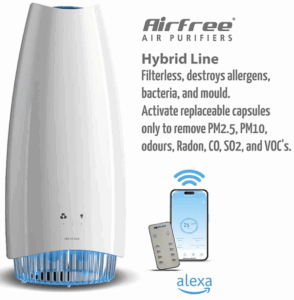
✅ Check It Out Here
Here’s the part most people overlook: a high-quality air purifier doesn’t just improve air quality—it keeps your screen and workspace cleaner.
Benefits:
-
Promotes better breathing and overall health
-
Works silently 24/7 while you focus
Think of it as invisible cleaning for the air—so your freshly cleaned screen stays pristine longer.
Quick Comparison: Screen Cleaning vs Air Purification
| Feature | Without Air Purifier | With Air Purifier |
|---|---|---|
| Screen clarity | Dulls quickly | Stays bright |
| Airborne dust & allergens | High | Reduced |
| Work environment | Contaminated | Healthier |
| Frequency of cleaning | Weekly or daily | Less frequent |
Step 6: Upkeep Advice 🗓
-
Screen cleaning should be done once a week for regular users and once a month for infrequent users.
-
Wash microfiber cloths every two to three weeks.
-
Replace the air purifier’s filters as directed by the manufacturer, often every six to twelve months.
Combining air purification with surface cleaning is like having two layers of protection for your lungs and eyes.
✅ Important Lessons
-
Before cleaning, always turn off and unplug the device.
-
Use soft liquids and microfiber towels.
-
For optimal effects, keep the keyboard and surrounding surfaces clean.
-
Invest in an air purifier to safeguard your surroundings.
-
Frequent upkeep maintains healthy air and crystal-clear screens.
💡 Fun Tip
Have you noticed that even after cleaning your screen, your eyes still feel fatigued? Unbeknownst to you, dust and other airborne particles can cause eye irritation. While keeping your technology looking like new, using a purifier can help with headaches, sneezing, and eye strain.
Final Remarks
There is more to computer screen cleaning than just looks. It has to do with safety, concentration, and health.
But what’s the true secret that most guides overlook? Just as important as the surface you touch is the air you breathe.
Combine a good air purifier with a regular screen-cleaning regimen. In addition to having pristine screens, your workstation will be healthier and fresher.