How To Clean Ps4 And Keep It Dust Free

If you’re anything like me, you’ve undoubtedly thought when you gazed at your PS4 one day:
“Hold on… Has the dust always been there?”
That’s where it begins. The fan sounds like a jet engine when you go to plug in a game, and then you realize it’s been exposed to years of Fortnite, Netflix, and pizza crumbs.
Let’s make that right.
This is my comprehensive, no-nonsense, hands-on approach to properly cleaning your PlayStation 4 so that it operates cleaner, quieter, and cooler.
I’ll even share with you my little-known trick for keeping the air in my gaming room fresh and free of those musty “console odors.”
🎮 Why It’s More Important Than You May Think to Clean Your PS4
Electronics are silently killed by dust.
When dirt, hair, and dust accumulate within your PS4, it:
-
causes the console to overheat by clogging the fans and vents.
-
Performance is slowed down (thermal throttling is real!)
-
makes more noise (the “whirring” sound isn’t typical).
-
And worst of all, it reduces how long your console lasts.
Cleaning becomes maintenance when you learn that the majority of PS4s die early from overheating and dirt.
🧰 Essentials
The cleaning loadout that has consistently worked for me is as follows:
| Tool or Material | Reasons for Needing This Tool or Material |
|---|---|
| Microfiber cloths | to clean surfaces without causing scratches |
| Compressed air | Dust can be blasted out of cracks and vents using compressed air. |
| Soft brush (for painting or applying cosmetics) | gently removes accumulation |
| Cotton swabs | for intricate ports and corners |
| A tiny Phillips screwdriver | If opening the shell is your intention, |
| 70–90% isopropyl alcohol | For thorough cleaning that leaves no trace |
| Optional: Using a brush nozzle, vacuum | To safely remove dust |
⚡ Step 1: Turn Off the Power
First, turn off the power. Always start safely.
Unplug all devices, including controllers, HDMI, and power cables.
Allow 10 to 15 minutes for the console to cool fully.
Transfer it on a spotless, level surface; a kitchen table or desk will work best.
The PS4 should never be cleaned while it is plugged in.
Sensitive internal components can be harmed even by static electricity.
🧽 Step 2: Start by Making the Exterior Look Alive
The outside creates the mood, so I start there.
Use a dry microfiber towel to wipe the entire surface.
For sticky places, use a cloth that has been mildly moistened with a few drops of isopropyl alcohol.
Gently stroke the seams, ports, and logo nooks with a delicate brush.
Pro tip: To avoid pushing dust deeper within, work with the vents’ direction rather than against it.
🌬️ Step 3: Safely Blast the Vents
Like lungs, your PS4’s vents are unable to breathe if they are clogged with dust.
The move is as follows:
Grab your can of compressed air.
When spraying, hold it erect and avoid tilting or shaking.
Make use of brief bursts, one second each, along every vent hole.
Maintain a minimum distance of 6 inches from the nozzle.
Dust clouds will be seen to fly forth. That’s the farewell to years of trapped air muck.
💡 Expert gaming advice: Try to do this outside; if not, the dust will simply return to your room (and we’ll speak about fixing that air problem in a minute).
🔧 Step 4: Deep Cleaning (Not Required, but Worthwhile)
You can go further if you have the courage to open your PS4 or if your warranty has long since expired.
Using your Phillips screwdriver, remove the top shell.
Dust the area around the fan and heatsinks with a brush or compressed air.
Use an isopropyl alcohol-dipped Q-tip to gently wipe the fan blades.
If you are not experienced, do not unplug anything or touch the motherboard.
Shut everything back up and pause to appreciate how brand-new it appears.
☕ As an Aside: The Surroundings and Console Are Clean
When I cleaned my PS4 last, I noticed that the dust emanating from the console was the same dust that was in my air.
I came to the realization that I was treating the symptom rather than the underlying problem.
I took action as a result.
🌿 The Air Purifier That Transformed My Setup
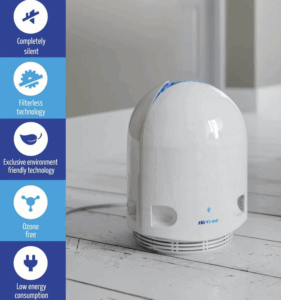
The P2000 Air Purifier
✅ Check It Out Here
(Truth bomb in the vein of Gary Halbert)
Okay, so I won’t sugarcoat this.
Even if you clean your PS4 once a week, it will constantly wind up dirty again if the air in your room is full of dust, pet hair, VOCs (volatile organic compounds), and microparticles.
At that point, I bought a basic HEPA + activated carbon air purifier for my house; it wasn’t a high-end one.
Two days later, I observed:
-
The air had a fresher scent.
-
My allergies were less agitated.
-
When will I dust my setup again? Not much there.
Take a moment to consider that. You’re progressively destroying your devices and your lungs by breathing in dusty, toxic air that you spend hundreds or thousands of dollars on.
A high-quality air purifier does more than just purify your air.
It safeguards your technology, your well-being, and the atmosphere of your house.
Gary Halbert would say this if he were writing it:
“You’re purchasing the freshness you forgot existed, not a filter.”
An air purifier provides you that every day, if you’ve ever entered a freshly cleaned room and said,
“Whoa, it smells so open and light.”
I keep mine in the middle of my living room arrangement, humming softly and collecting dust before it falls.
Indeed, my PS4 fans are now hardly able to murmur.
🧼 Step 5: Additionally, Clean Your Controllers
Those DualShock controllers are magnets for germs, so it’s not just your PS4 that’s getting dirty.
This is my brief routine:
-
Use a microfiber cloth soaked in isopropyl alcohol to wipe.
-
To gently clean buttons and seams, use a toothpick.
-
To get underneath sticky triggers, press them while cleaning.
-
Remember to include the speaker grille and charging port.
How much better they feel (and smell) will astound you.
🌈 Step 6: Continue to Keep It Clean
Let’s keep your PS4 looking and functioning like new once it has been restored.
My personal checklist to prolong its life is as follows:
-
Avoid placing your PS4 on the floor, especially if it is carpeted.
-
Every week, clean the surfaces around it.
-
Turn on your air purifier every day—it really does make a big difference.
-
Discs should be kept in cases to reduce dust.
-
Steer clear of cooking or smoking close to your gaming equipment.
Little behaviors have a big impact; consistency is more important than intensity.
✨ Last Step: Try and Have Fun
Reinstall your PS4’s plug.
Press the power button.
Pay attention.
Your reward will be if it loads more quickly, sounds smoother, and is quieter.
Performance, longevity, and peace of mind are just as important as appearances when it comes to a clean console.
🧭 The Clean PS4 Game Plan Recap
Let’s finish this off nicely:
-
Unplug and tidy up your workspace.
-
Start by cleaning the outside.
-
Apply pressurized air to the vents.
-
Opening it up for a thorough cleaning is optional.
-
Clean controllers as well.
-
Utilize an air purifier to prevent the return of dust.
Your PS4 will likely outlast its peers by years if you continue this cycle every several months.
🕊️ Concluding Remark
Cleaning your PS4 is a small ritual of care that goes beyond simple upkeep.
For your equipment. For your own area. For yourself.
Let’s face it: a fresh environment makes your breathing easier, your gameplay more fluid, and your entire setup feel more alive.
Don’t freak out the next time your PS4 fan roars; instead, get a cloth, an air can, and possibly an air purifier and give the system some affection.