
How To Clean Air Pod Max Ear Cups & Maintain Freshness
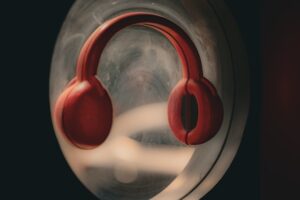
It’s Possible That Your AirPods Are Hiding More Than Smudges
Every day, you wear your AirPods Max for meetings, workouts, and the commute. They feel comfortable and sleek. And so clean. That’s what you believe, anyway.
The fact is that sweat, oils, grime, and bacteria are drawn to your ear cups. Invisible dirt builds up each time you wear them, which over time may result in:
-
Bad smells
-
Skin irritation
-
Reduced quality of sound
After a month of use, I noticed a slight odor and a sticky sensation. Everything changed after cleaning.
—An actual user of AirPods Max
Most people believe that a simple wipe with a dry towel is sufficient, but a proper regimen is necessary if you want them to be properly clean. Additionally, since dust and germs in the air can return to your freshly cleaned ear cups, you can safeguard the air surrounding your house or place of work while you’re at it.
Step 1: Assemble Your Equipment ♠️
Prior to taking your hands on your AirPods Max:
-
Microfiber cloth that is soft and lint-free
-
Gentle detergent or soap
-
Warm water
-
Cotton swabs for regions that are difficult to reach
-
70% isopropyl alcohol is optional
💡 Because your ear cups are fragile electronics, never immerse them in water or allow liquid to get through the mesh.
Step 2: Take Out the Ear Cushions
It’s easy to remove the AirPods Max ear cushions. Eliminating them improves cleaning efficiency and lowers the possibility of liquid damage.
-
Remove the cushion from the ear cup gently.
-
Look for any obvious debris, perspiration, or dirt.
-
Place the pillow on a fresh towel and set it away.
Pro Tip: Before cleaning, snap a picture of the ear cup. It aids in your memory of the proper way to rejoin the cushions.
Step 3: Clean the Ear Cushions
For pillows made of mesh or fabric:
-
Warm water and a tiny bit of mild soap should be combined.
-
Wipe the surface with a damp microfiber towel.
-
Use a fresh, moist cloth to rinse.
-
Avoid using heat or bright sunshine and let the air dry entirely.
Regarding leather cushions:
-
Only use a dry or slightly moist cloth.
-
Steer clear of alcohol and washing since they can dry out and harm leather.
Advice: Frequent weekly cleaning avoids accumulation that irritates the skin and produces odors.
Step 4: Wash the Frame and Headband
A dry microfiber cloth can be used for:
-
Frame for the headband
-
Areas of hinges
-
Surfaces made of metal
-
Lightly moisten the cloth with water or 70% isopropyl alcohol to remove tough smudges. Steer clear of too much fluids.
-
A dry cotton swab works well for cleaning small crevices, such as mesh ports and edges.
Step 5: Carefully Reassemble
After everything has dried:
-
Reattach the ear cushions.
-
Make sure they snap in firmly.
-
Repeatedly wipe down for a smooth finish.
🎧 Bonus: Clean AirPods Max sound better in addition to looking better. Over time, dust or perspiration accumulation might have a subtle impact on acoustics.
The Unspoken Risk: Dust and Allergens in the Air
If the air surrounding you is contaminated, your headphones are still susceptible even after cleaning. Airborne bacteria, mold spores, dust, and pollen might return to your freshly cleaned ear cups.
Imagine cleaning a countertop in a dusty room; your efforts will only last so long unless you can manage the atmosphere.
Step 6: Safeguard Your Health and Air
Airfree Elite Air Purifier – Quiet & Dust-Free Filter
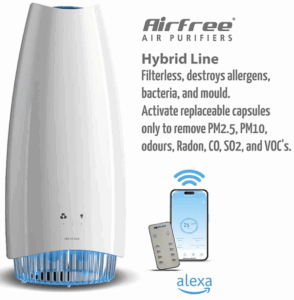
✅ Check It Out Here
The majority of people are unaware that air purifiers aren’t only for big spaces; they also keep accessories and devices cleaner.
Advantages of using an air purifier in conjunction with AirPods Max cleaning:
-
Minimizes the amount of dust and allergens that fall upon cushions from the air.
-
Helps stop microorganisms that cause odors.
-
Makes the listening environment healthier and cleaner.
A Brief Comparison of Air Purifier Use Before and After
| Aspects | With Air Purifiers | Without Air Purifiers |
|---|---|---|
| Dust on the ear cups | Very little accumulation | Accumulates quickly |
| Airborne Allergens | Much less | High |
| Sweat and Bacterial Odors Over Time | Much less | High |
| Weekly thorough ear cup maintenance | Less frequent and easier | Frequent and more difficult |
Step 7: Upkeep Advice 🗓
-
Depending on usage, clean the ear cushions every week or every two weeks.
-
Every one to two weeks, wipe the headband and frames.
-
To avoid dust buildup, use an air purifier in your workspace.
-
When not in use, keep the AirPods Max in a dry, clean case.
Little routines add up to long-term comfort, durability, and cleanliness.
✅ Important Lessons
-
Before cleaning, always take out the ear cushions.
-
For fabric cushions, use warm water and gentle soap; stay away from harsh chemicals on leather.
-
Carefully clean the frame and any cracks.
-
Before putting everything back together, let it all dry fully.
-
Use an air purifier in conjunction with cleaning for benefits that last.
💡 Fun Tip
In addition to being unpleasant, odorous headphones are a sign of bacterial growth, which can hurt your ears. Without requiring additional work, you may maintain a healthy and fresh listening experience by using an air purifier and following a cleaning plan.
Final Remarks
Cleaning your AirPods Max ear cups is easy, but it’s just one step in the process. Controlling the air that headphones sit in is crucial for genuinely clean, fresh headphones.
When you combine a good air purifier with appropriate cleaning methods, you’ll benefit from:
-
Odor-free, cleaner headphones
-
Reduced exposure to allergens in your ears
-
Electronics that live longer
-
A fresher, healthier atmosphere at home