
How To Clean A Mac Book Keyboard Carefully

“Crumbs Ruined My $2,000 MacBook?”
Your spacebar abruptly stops functioning as you’re typing away on emails, projects, or the next great idea.
Or the “E” key becomes sticky.
You tap more forcefully, then more forcefully.
Nothing.
A dirty MacBook keyboard is the secret enemy of productivity.
The offender? Not simply coffee spills or crumbs. It’s the dust in the air of your house that keeps slipping under your keys.
“I believed Apple’s butterfly keyboard to be brittle. It turns out that the issue was with the quality of my air.”
— Designer Mark T.
The good news is that you can safeguard it and fix it.
Let’s go over how to safely deep clean your MacBook keyboard — and why it’s like brushing your teeth without ever cleansing your mouth if you don’t also address the air surrounding you.
Step 1: Turn Off the Power ♠️
Safety should always come first.
Turn off your MacBook entirely.
Take off any accessories and unplug the charger.
Disconnect the battery if it’s a removable model (earlier MacBooks).
🧠 Expert Advice: Avoid cleaning your keyboard while the laptop is powered on as it may cause short circuits or uninvited orders.
Step 2: Turn It Upside Down
Literally, yes.
Almost vertical, hold your MacBook at a 75° angle.
To get rid of any loose dust or crumbs, gently shake or tap.
You’ll be shocked to see what comes out, including hair, lint, and dust.
💡 Hint: To see what has been dwelling under your keys, do this over a light surface, such as white paper.
Step 3: Make the Correct Use of Compressed Air 💨
Apple themselves promote it as follows:
Make use of a straw-nozzled compressed air can.
Spray brief bursts across the keyboard from left to right.
Repeat on each side after rotating the MacBook 45 degrees.
To prevent moisture buildup, keep the nozzle at least one inch away.
Avoid using a hair dryer. Hot wetness may be blown into the circuits by it.
Step 4: Cleaning the Surface
It’s time to clean what’s visible after blowing out the debris:
Apply a 70% isopropyl alcohol solution on a microfiber towel to dampen it.
Gently wipe the top and sides of each key.
MacBooks detest moisture, so stay away from too much liquid.
Using cotton swabs to clean the areas between keys is optional.
✨ Easy Fix: This eliminates bacteria and viruses in addition to dirt. It’s true that your keyboard comes into contact with more germs than a toilet seat.
Step 5: Thoroughly Cleaning Each Key
If a key feels sluggish or sticky:
Gently lift it with a plastic pry tool (on older models—not butterfly switches).
Use a soft brush or compressed air to clean below.
Reinstall the key with a snap.
⚠️ Caution: The butterfly and scissor-switch keys on the newer MacBook models are delicate; only use them if you feel comfortable doing so. Otherwise, leave it to Apple or a certified technician.
The Unknown Reason Behind Unclean Keyboards 😷
Few people are aware of this, but even if you never eat close to your laptop, it will still get dirty.
How? Dust in the air.
Invisible particles land on your keyboard, trickle between the keys, and cover the internal sensors every day. Pollen, skin cells, and fibers are all present in that fine coating of household dust, which does more than just make your keyboard unclean. It also pollutes your lungs.
Airfree Elite Air Purifier – Quiet & Dust-Free Filter
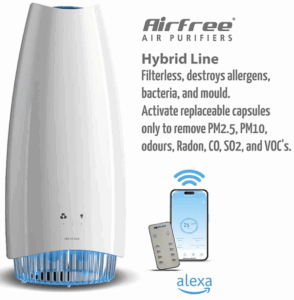
✅ Check It Out Here
“My keyboard remained cleaner for months after I purchased an air purifier, in addition to my allergies getting better.”
🚨 Air Pollution in Disguise: Keyboard Gunk
Let’s examine what is actually hitting the keys on your laptop.
| Dust Type | Origin | Reasons for Its Negative Effects |
|---|---|---|
| Flakes of skin | People naturally shed | Feeds microorganisms and produces filth. |
| Fibers used in textiles | Curtains, clothing, and carpets | Keep dust mites on hand. |
| The pollen | HVAC and open windows | Aggravates allergies. |
| Spores of mold | Breathing problems may arise in damp locations. | — |
| Soot from combustion | Traffic, cooking, and candles | Harms the lungs and electronics. |
The Benefit of Air Purifiers
Dust & Allergy Hero: Austin Air Allergy Machine
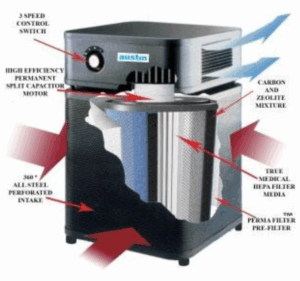
✅ Check It Out Here
What do you think is happening to your lungs if the air you breathe is so filthy that it can clog the inside of a sealed metal MacBook?
You could:
-
Continue using wipes and sprays to combat dust indefinitely… or
-
Your laptop, your furniture, and your breathing will all remain cleaner if you clean your air just once.
Make sure the keyboard is clean. pure air. Have a clear head.
Avoid Further Accumulation
After cleaning your keyboard, maintain it that way:
-
When not typing, cover your keyboard.
-
Before using your MacBook, wash your hands since cleaner keys result from oil-free fingers.
-
No matter how “careful” you believe you are, don’t eat on your laptop.
-
Use a microfiber cloth to clean once a week.
🧽 Bonus: If you live close to a busy road or a construction site, keep your MacBook in a case when not in use.
The Upgrade to “Clean Air”
Controlling the air around you is the true key to maintaining a clean keyboard and body.
Even if you clean your MacBook once a week, dust and other tiny particles will still land on your screen, desk, and lungs if your indoor air is polluted.
A HEPA air purifier can help with that.
What it does:
-
eliminates tiny particles, dust, and pollen up to 99.97%.
-
lessens the frequency of electronics cleaning.
-
maintains the freshness and clarity of your lungs and workstation.
Imagine your keyboard remaining clean after just one cleaning. That is how filtered air differs.
Step 9: Regular Maintenance
Regarding a MacBook that feels and looks brand new:
-
Use a microfiber cloth to wipe once a week.
-
Every month: Use compressed air to blow out dust.
-
Replace the filter in your air purifier every six to twelve months.
-
Every 12 to 18 months: If necessary, have a professional deep clean.
In addition to keeping your breathing space smooth, this technique maintains your technology operating efficiently.
✅ Important Lessons
-
Before cleaning, always turn off the electricity.
-
Alcohol and compressed air should be used responsibly.
-
Use clean air and coverings to avoid accumulation.
-
Dust is the enemy of both health and technology.
-
Air purifiers significantly lessen the buildup of dust.
💡 Interesting Fact
Because even tiny dust particles might interfere with delicate electronics, NASA uses HEPA filters to keep spacecraft habitats clean.
It is most likely suitable for your home office if it is suitable for the International Space Station.
Not every MacBook malfunction is caused by a “hardware issue.”
Sometimes it’s a problem with the quality of the air.
Your devices do best in a clean environment, just like your body does.
Device lifespans are shortened by dust and pollution, including logic boards, fans, and keyboards.
It’s a good idea to clean your MacBook keyboard. But dust is being fed by air that has been cleaned? That is brilliant.
Conclusion
While cleaning your MacBook keyboard is essential, most people don’t consider the upgrade of using clean air to safeguard it.
So feel free to wipe those keys, blow out that air, and relax.
Because the ideal office is life-proof, not simply dust-free.